How Invalid Adsence Clicks Detect by Google

Fooling Google Adsense is like you make a donkey yourself
Thinking to cheat AdSense?Stop that. It will never bring you anywhere. You might pull it off with smaller ads network, but definitely not with Google. Here are some detection methods they might use. At the very least, they have the resources to do so.

IP Address If the AdSense click is originated from the same IP Address as the one used for accessing your AdSense account, your account is flagged.

Cookies Most home users do not use static IP Address for Internet connection. In most cases just disconnect and reconnect will give you a new IP Address. But don’t forget, Google has set cookies on your computer.

How I Place Adsense Code in Blogger Post

There is trick to add Google AdSense and other advertising network such as AdBrite ad unit right beside and inside within Blogger post content, so that the ad block will appear wrapped and floated inline to the top left or top right next to the blog text. If you do not like this layout and dislike the prominent location the ads are displayed, there are other places within blog post to put the ad code.


How to install/uninstall the preview tool of AdSense?

The preview tool is available in all active AdSense languages. Installing the tool is easy, and only takes a few minutes. To install it, you'll need to add a registry file to your Windows system, by following the instructions below.

By installing and/or using the AdSense Preview Tool, you agree to abide by the Google Toolbar Terms of Use (which can be found at http://toolbar.google.com/terms) as if such terms applied to the AdSense Preview Tool and Google's advertising services.  Notwithstanding the Terms of Use, you agree to use the AdSense Preview Tool solely to manage your AdSense account or as part of a good faith evaluation of the AdSense program to help you determine whether to enroll as an AdSense publisher.  You may not use the AdSense Preview Tool in any manner that could damage, disable, overburden, or impair any Google services.

No AdSense Ads Below Blog Title or Post Title

By referring to Google AdSense placement heat map, we put Google AdSense ads above blog content (below post title) for better performance. But Google AdSense team does not quite agree with the ads placement.


QuickOnlineTips received an email from Google AdSense support pointing out the issue on their site.

In fact, Google Adsense Blog published 2 guidelines earlier and one of them is “ads shouldn’t be placed under a title or section heading in a way that implies that the ads are not ads.”

I didn’t take much attention to the guideline because I thought mine is different than the example. My AdSense ads was separated by categories and date. But it seems AdSense team think the different.

AdSense team advised QuickOnlineTips that:

publishers may not label the Google ads with text other than ’sponsored links’ or ‘advertisements’.

As a result, QuickOnlineTips now put a “ADVERTISEMENT” word above the AdSense ads.

Cleaning (Refreshing) Cache in Magento

The Magento Admin panel calls it refreshing (Refresh) the cache, while within the code it’s refered to as “cleaning” the cache.

If you want to Refresh your cache within the admin panel, simply go to System > Cache Management. Drop the box labeled “All cache” down to the Refresh option and hit the Save cache setting button near the upper-right of the window.

If you want to clear your cache from the command line, SSH into your server and get into the base directory of your magento installation. Type the following commands:

cd var/cache
rm -rf *

If you want to clean the cache from within your code (maybe within a cron or something), you’ll need to place the following PHP code within your script wherever you need the cache cleaned:....

Create Custom Category Attributes with phpMyAdmin (Tutorial)

The following is a brief tutorial for creating a custom category attribute. This has only been tested by creating a textfield-type attribute in Magento’s version 1.3.2. However, to the best of my current knowledge, it should work in any versions 1.2+ and for any type of attribute. Note: changing the attribute type will require a couple changes to the SQL below. So on we go…

  • 1. Open your Magento database using phpMyAdmin.
  • 2. We will first find the proper attribute_id for your new attribute.  Run the following SQL statement and keep the resulting number handy: 

Some Best Practices for C# Application Development

Few days ago, in one my earlier posts, I discussed about “Some Best Practices for Silverlight Application Development (XAML)” which got a huge hit by my readers. I got a lot of feedback on that too. Someone from the community also suggested that I write some best coding practices on C#. This struck my mind and hence I decided to write some best practices about C# coding here from my past few years of experience.
For the past few years, I learned a lot and tried to share the best of my knowledge to others who are new in the software development field. I contribute this post to those fellow members. Hope, I will get more feedback and/or suggestions here too.
I liked C# programming when I started with .NET technology. I never tried to write code in VB.NET as I decided my career on that. When I was new to this field, I made a lot of mistakes and from those mistakes I learnt more things. There’s a proverb: “Mistakes make you learn more & more…”. My career was one of them. Also there’s a proverb: “There’s no end to learning in life. Each second, a person can learn”. So, if there are any more suggestions, please share those with me. It will help me and others to learn more in a proper way.
One second, there are various posts available on the internet regarding the same topic. If you do a Google, you will get a number of them. But these collections are based on my experiences, those I learnt and thought of sharing.
Let’s stop here and start discussing the Best Coding Practices of C# application development. Here are some of them:

  • Use proper Naming Conventions
    • Always use Camel or Pascal naming format
    • Avoid all uppercase or lowercase names
    • Never use a name which begins with numeric character
    • Always prefer meaningful names for your class, property, method, etc.
    • Never build different names varied by capitalization
    • Don’t use the same name used in .NET Framework
    • Avoid adding prefixes or suffixes for your identifiers
    • Always use “I” as prefix for Interfaces
    • Always add “Exception” as suffix for your custom exception class
    • Never prefix or suffix the class name to its property name
    • Prefix “Is”, “Has” or “Can” for boolean properties
    • Don’t add prefix for your controls
  • Decide between Value Types and Reference Types
  • Always Use Properties instead of public variables
  • Use Nullable data types whenever required
  • Prefer Runtime Constants over Compile time Constants
  • Prefer “is” and “as” operators while casting
  • Prefer string.Format() or StringBuilder for string concatenation
  • Use Conditional attributes when you need them
  • Use ‘0’ (zero) as default value enum value types
  • Chose between Equals() and Equal (==) operator
  • Always prefer the foreach(…) loop
  • Initialize member variables at the time of assignment
  • Initialize static member variables with static constructors
  • Use constructor chaining whenever possible
  • Minimize boxing & unboxing of objects
  • Properly utilize try/catch/finally blocks
  • Catch only that Exception which you can handle
  • Use IDisposable interface
  • Utilize LazyInitializer in most of the cases
  • Split your logic in several small and simple methods
  • Try to use Patterns & Practices like MVP/MVC/MVVM
  • Always prefer DataBinding to populate values in the UI

Delete Data in GridView Using Template Button

This article snippet explains how to delete data from GridView using template buttons.
Now we look at how to add template button in GridView. First select Edit Columns in GridView.


UserControl/Control : How to get a reference to an element of the template

When you want to create your own custom control, you have two choices: create a UserControl or inherit from one of the "Control's classes" (ContentControl, ItemsControls or Control itself). When doing so, you'll surely need to access to the visual parts of your template from the code to add to it a nice behavior.

In this post, we'll discover how to access the template children by using the FindName method even on UserControl.

You Create a Control

I won't explain how to create a custom control, so here is its base code:

[TemplatePart(Name = "PART_MyGrid", Type = typeof(Grid))]
  public class MyCustomControl : ContentControl
  {
    private Grid myAimedGrid;
 
    static MyCustomControl()
    {
   //Overrides the style by ours
      DefaultStyleKeyProperty.OverrideMetadata(typeof(MyCustomControl),
          new FrameworkPropertyMetadata(typeof(MyCustomControl)));
    }
  } 


Limitation of Blogger ( Blogspot) Blogs

There are usage limits imposed by every free service, including Blogger.com. Often, the limits are necessary for design purposes (e.g., how much space to cater for each form field), logistics (e.g., server space and speed) and financial considerations. Most of the answers on the amount of storage space, limitations on posts, etc. are found in Blogger Help. However, since we still receive queries on that, we thought we shall add a few more items to that list for the benefit of the new Bloggers. These limits apply to one Google account, and if you find yourself exceeding these limits, one solution would be to register for an additional Google account to enjoy the services.

SQL DB Restore using PowerShell

If you are looking for a PowerShell script that lets you restore a database from a backup (.bak) file to MSSQL server, then this is the right place for you.

Database Restore - SQL

Let’s say you have a .bak file (Example: AdventureWorks), and you would like to restore it to an SQL server using PowerShell. If you use SQL Server 2008 Management Studio and click on the “Script” button, you will get the SQL statement that will do that restore for you.


The way to find a hotspot

Today I want to describe the way to find a hotspot without profilers. I often use this approach and find it effective and simple enough. The only tools you need are any Windows debugger (I prefer WinDbg, but you can use your favorite one) which should always be in your hands if you decided to investigate some performance issue (as well as any other problem with your software) and tool like Process Explorer which are available free from Windows Sysinternals. You can use this method without profiler at all or in conjunction with profiler to clarify the result of profilers work.

Before explaining the approach, I want to define the term “hotspot”. There are different definitions which can be applied in different contexts. In this article, we consider a hotspot as a limited set of instructions on which execution spends significant CPU time or more CPU time than you expect from it.

The process is divided into the three steps. If you used a profiler and have a call graph, you can miss the first two steps and jump to step number three to verify the profilers result and find out the hotspot most precisely. Nevertheless, I recommend you to go through all the steps because the results returned by profilers sometimes can be very obscure and you will lose time rolling around a call graph or other related information. Even if your profiler was absolutely right, you’ll have one more confirmation of its result. Sometimes it’s better to check twice. :)


Fixed -problems installing Windows Phone Developer Tools

Today, I had some troubles first uninstalling my existing CTP release of the Windows Phone Developer Tools. It was a required step to be able to install the newest release of these tools.

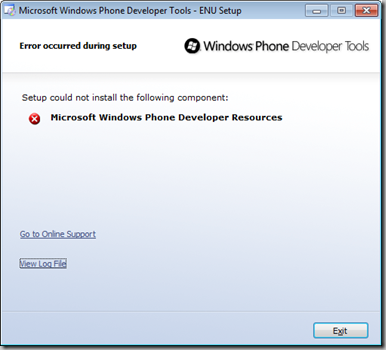
Now that I managed to uninstall the previous version, I have found other problems installing the newer one. More precisely, the problem appeared when trying to install the Windows Phone Developer Resources package, getting an error like the following in the automatic web installer (it surprisingly required a reboot when starting to install it, and the error did pop up when resuming the install process after the reboot).


How to create an animated expander

The expander control can be used in a lot of situations but the one proposed by default is quite "rigid".

In this post we will discover how to animate it quite simply just via XAML !


The WPF engine lets us redefine the template of the controls and we'll just do that.

The goal aimed

What we aim is to get the same functionnality as the original expander.
This is not as simple as we tought and I've seen a lot of expander loosing some of their behaviors when they became "animated" : original value of IsExpanded ignored, ExpandDirection ignored, etc...

The Compound Case of the Outlook Hangs

This case was shared with me by a friend of mine, Andrew Richards, a Microsoft Exchange Server Escalation Engineer. It’s a really interesting case because it highlights the use of a Sysinternals tool I specifically wrote for use by Microsoft support services and it’s actually two cases in one.

The case unfolds with a systems administrator at a corporation contacting Microsoft support to report that users across their network were complaining of Outlook hangs lasting up to 15-minutes. The fact that multiple users were experiencing the problem pointed at an Exchange issue, so the call was routed to Exchange Server support services.

The Exchange team has developed a Performance Monitor data collector set that includes several hundred counters that have proven useful for troubleshooting Exchange issues, including LDAP, RPC and SMTP message activity, Exchange connection counts, memory usage and processor usage. Exchange support had the administrator collect a log of the server’s activity with 12 hour log cycles, the first from 9pm until 9am the next morning. When Exchange support engineers viewed the log, two patterns were clear despite the heavy density of the plots: first and as expected, the Exchange server’s load increased during the morning when users came into work and started using Outlook; and second, the counter graphs showed a difference in behavior between about 8:05 and 8:20am, a duration that corresponded exactly to the long delays users were reporting:

15 Things that Twitter calls spam


Ever wondered what twitter considers spam ? Well here is a list to start with
  1. If you have followed a large amount of users in a short amount of time;
  2. If you have followed and unfollowed people in a short time period, particularly by automated means (aggressive follower churn)
  3. If you repeatedly follow and unfollow people, whether to build followers or to garner more attention for your profile
  4. If you have a small number of followers compared to the amount of people you are following
  5. If your updates consist mainly of links, and not personal updates
  6. If a large number of people are blocking you
  7. The number of spam complaints that have been filed against you
  8. If you post duplicate content over multiple accounts or multiple duplicate updates on one account
  9. If you post multiple unrelated updates to a topic using hashtags
  10. If you post multiple unrelated updates to a trending or popular topic
  11. If you send large numbers of duplicate @replies
  12. If you send large numbers of unsolicited @replies in an attempt to spam a service or link
  13. If you repost other user’s content without attribution.
  14. If you have attempted to “sell” followers, particularly through tactics considered aggressive following or follower churn.
  15. Using or promoting third-party sites that claim to get you more followers (such as follower trains, sites promising “more followers fast,” or any other site that offers to automatically add followers to your account).

Attributes and functions for elements

attributes
returns an array of all the attributes of this element. Does not work with Internet Explorer below version 6.
data
returns or sets the textual data of the node
nodeName
returns the name of the node (the HTML element name)
nodeType
returns the type of the node — 1 is an element node, 2 attribute and 3 text.
nodeValue
returns or sets the value of the node. This value is the text when the node is a textnode, the attribute if it is an attribute or null if it is an element.
getAttribute(attribute)
returns the value of the attribute attribute.

Functions to reach an element in the page

getElementById('elementID')
returns the element with the id elementID as an object.
getElementsByTagName('tag')
returns all elements with the name tag as an array.

Of course you can mix and match these two. Some examples:

Example:

document.getElementById('navigation').getElementsByTagName('a')[3];
returns the fourth link inside the element with the ID 'navigation'
document.getElementsByTagName('div')[2].getElementsByTagName('p')[0];
returns the first paragraph inside the third div in the document.

HTML Character Codes (Entities) How to Get Those 'Strange' ‰ ¥ § ¾ Ä ø ÷ æ ¿ » ¶ Characters On Your Web Page

Name
Code

Numeric
Code

As
Rendered

Common
Name
‘ N.A. ‘ left single quote
’ N.A. ’ right single quote
‚ N.A. ‚ single low-9 quote
“ N.A. “ left double quote
” N.A. ” right double quote
„ N.A. „ double low-9 quote
† N.A. † dagger
‡ N.A. ‡ double dagger
‰ N.A. ‰ per mill sign
‹ N.A. ‹ less than
(Left Angle Quote)
› N.A. › greater than
(Right Angle Quote)
– – – en dash
— — — em dash


nonbreaking space
¡ ¡ ¡ inverted exclamation
¢ ¢ ¢ cent sign
£ £ £ pound sterling
¤ ¤ ¤ general currency sign
¥ ¥ ¥ yen sign
¦
&brkbar;
¦ ¦ broken vertical bar
§ § § section sign
¨
¨
¨ ¨ umlaut
© © © copyright
ª ª ª feminine ordinal
« « « left double angle quote
¬ ¬ ¬ not sign
­ ­ ­ soft hyphen
® ® ® registered trademark
¯ or
&hibar;
¯ ¯ macron
° ° ° degree sign
± ± ± plus or minus
² ² ² superscript two
³ ³ ³ superscript three
´ ´ ´ acute accent
µ µ µ micro sign
paragraph sign
· · · middle dot
¸ ¸ ¸ cedilla
¹ ¹ ¹ superscript one
º º º masculine ordinal
» » » right double angle quote
¼ ¼ ¼ one-fourth
½ ½ ½ one-half
¾ ¾ ¾ three-fourths
¿ ¿ ¿ inverted question mark
À À À uppercase A, grave
Á Á Á uppercase A, acute
   uppercase A, circumflex
à à à uppercase A, tilde
Ä Ä Ä uppercase A, umlaut
Å Å Å uppercase A, ring
Æ Æ Æ uppercase AE
Ç Ç Ç uppercase C, cedilla
È È È uppercase E, grave
É É É uppercase E, acute
Ê Ê Ê uppercase E, circumflex
Ë Ë Ë uppercase E, umlaut
Ì Ì Ì uppercase I, grave
Í Í Í uppercase I, acute
Î Î Î uppercase I, circumflex
Ï Ï Ï uppercase I, umlaut
Ð Ð Ð uppercase Eth,
Ñ Ñ Ñ uppercase N, tilde
Ò Ò Ò uppercase O, grave
Ó Ó Ó uppercase O, acute
Ô Ô Ô uppercase O, circumflex
Õ Õ Õ uppercase O, tilde
Ö Ö Ö uppercase O, umlaut
× × × multiplication sign
Ø Ø Ø uppercase O, slash
Ù Ù Ù uppercase U, grave
Ú Ú Ú uppercase U, acute
Û Û Û uppercase U, circumflex
Ü Ü Ü uppercase U, umlaut
Ý Ý Ý uppercase Y, acute
Þ Þ Þ uppercase THORN
ß ß ß lowercase sharps
à à à lowercase a, grave
á á á lowercase a, acute
â â â lowercase a, circumflex
ã ã ã lowercase a, tilde
ä ä ä lowercase a, umlaut
å å å lowercase a, ring
æ æ æ lowercase ae
ç ç ç lowercase c, cedilla
è è è lowercase e, grave
é é é lowercase e, acute
ê ê ê lowercase e, circumflex
ë ë ë lowercase e, umlaut
ì ì ì lowercase i, grave
í í í lowercase i, acute
î î î lowercase i, circumflex
ï ï ï lowercase i, umlaut
ð ð ð lowercase eth,
ñ ñ ñ lowercase n, tilde
ò ò ò lowercase o, grave
ó ó ó lowercase o, acute
ô ô ô lowercase o, circumflex
õ õ õ lowercase o, tilde
ö ö ö lowercase o, umlaut
÷ ÷ ÷ division sign
ø ø ø lowercase o, slash
ù ù ù lowercase u, grave
ú ú ú lowercase u, acute
û û û lowercase u, circumflex
ü ü ü lowercase u, umlaut
ý ý ý lowercase y, acute
þ þ þ lowercase thorn,
ÿ ÿ ÿ lowercase y, umlaut

Scores on The Day Of Resurrection

When the Day of Resurrection comes, a man's wealth and capital will be his Hasanaat (good deeds). If he had done wrong to any people, they will take from his hasanaat to the extent that he mistreated them. If he does not have any hasanaat, or if his hasanaat run out, then some of their sayi`aat (bad deeds) will be taken and added to his burden.

Bukhari narrated on the authority of Abu Hurayrah that the Messenger of Allah (p.b.u.h.) said:

"Whoever wronged his brother with regard to his honor or any other matter, should seek his forgiveness today, before there are no longer any Dinars, or Dirhams; and if he has any righteous deeds, they will be taken from him, in accordance with the wrong he did; and if he has no hasanaat, some of the sayi`aat of his counterpart will be taken and added to his burden:" (Bukhari: Kitaab al-Mazaalim, Baab man kaanat lahu mazlamah 'inda rajul, Fath al-Baari, 5/101)

This person whose Hasanaat (good deeds) are taken from him by the people, and then has their Sayi'aat (bad or evil deeds) placed on his own back, is the one who is bankrupt, as the Messenger (p.b.u.h.) called him. Muslim narrated from Abu Hurayrah that the Messenger of Allah (p.b.u.h.) said:

"Do you know who is the one who is bankrupt?" They said, 'The bankrupt is the one who has no money and no possessions.' He said, 'Among my Ummah, the one who is bankrupt is the one who will come on the Day of Resurrection with prayer and fasting and Zakah (to his credit), but he will come having insulted this one, slandered that one, consumed the wealth of this one and shed the blood of that one, and beaten that one. So they will all be given some of his hasanaat, and when his hasanaat run out, before judgment is passed, some of their sins will be taken and cast onto him, then he will be cast into the Fire.'" (Muslim: 4/1998, Hadith no. 2581)

If a debtor died when he still owed money to people, they will take from his Hasanaat whatever is in accordance with what he owes them. In Sunan Ibn Majah it is narrated with a Saheeh isnad that Ibn Umar (May Allah be pleased with him) stated: The Messenger of Allah (p.b.u.h.) said:

"Whoever dies owing a Dinar or a Dirham, it will be paid from his Hasanaat, for then there will be no Dinars or Dirhams." (Saheeh al-Jaami as-Sagheer, 5/537, Hadith no. 6432)

If people wronged one another, the score will be settled between them. If they mistreated one another equally, then there will be no score to settle. If one of them is still owed something by the other, he will take what he is entitled to.

In Sunan at-Tirmidhi it is narrated that Aisha said: "A man came and sat in front of the Messenger of Allah (p.b.u.h.), and said, 'O Messenger of Allah, I have two slaves who tell me lies, betray and disobey me, and I insult them and beat them. What is my position with regard to them?' The Messenger of Allah (p.b.u.h.) said:

'On the Day of Resurrection, their betrayal, disobedience and lying will be measured against your punishment of them. If your punishment is commensurate with their wrongs, then there will be no score to settle. If your punishment of them was less than their sins deserved, then this will count in your favour. If your punishment of them was more than their sins deserved, then the score will be settled against you.' The man turned away and started to weep. The Messenger of Allah (p.b.u.h.) said to him, 'Have you not read the words of Allah?''"

"And We shall set up Balances of justice on the Day of Resurrection, then none will be dealt with unjustly in anything. And if there be the weight of a mustard seed, We will bring it. And Sufficient are We to take account." (Quran 21: 47).'" (Mishkaat al-Masaabeeh, 3/66, Hadith no. 5561) It is also narrated in Saheeh al-Jaami`, 6/327, Hadith no. 7895, where it attributed to Ahmad and Tirmidhi.)

Because Zulm (oppression) is such a serious matter, it is better for those who fear that Day to give up oppression and avoid it. The Messenger (p.b.u.h.) has told us that oppression will be darkness on the Day of Resurrection. Bukhari and Muslim narrated from Abdullah Ibn Umar that the Prophet (p.b.u.h.) said:

"Oppression (Zulm) will be darkness (Zulumaat) on the Day of Resurrection." (Bukhari: Kitaab al-Mazaalim, Baab az-Zulm Zulumaat Yawm al-Qiyaamah, Fath al-Baari, 51100; Muslim, 4/1969, Hadith no. 2579)

Muslim narrated from Jaabir ibn Abdullah that the Messenger of Allah (p.b.u.h.) said:

"Beware of oppression (Zulm), for oppression will be darkness (Zulumaat) on the Day of Resurrection." (Muslim: 4/1969, Hadith no. 2578)